Your scale weighs 12.450 kg — the value lands in Excel cell B2 instantly. Bill Redirect with the free Microsoft Excel plugin creates a real-time connection between any RS-232, USB or Ethernet scale and your spreadsheet. Press PRINT on the scale, the weight appears in the cell.
| A | B | C | |
|---|---|---|---|
| 1 | Date | Weight (kg) | Product |
| 2 | 2026-06-10 | 12.450 | BOX-0042 |
| 3 | 2026-06-10 | 8.120 | BOX-0041 |
| 4 | 2026-06-10 | 15.890 | BOX-0040 |
Total setup time: about 15 minutes. The plugin is free — you only need a Bill Redirect license ($45 CAD per computer, trial available).
Download and install Bill Redirect on the Windows computer where your scale is connected. This is the engine that reads, filters and routes the weight data.
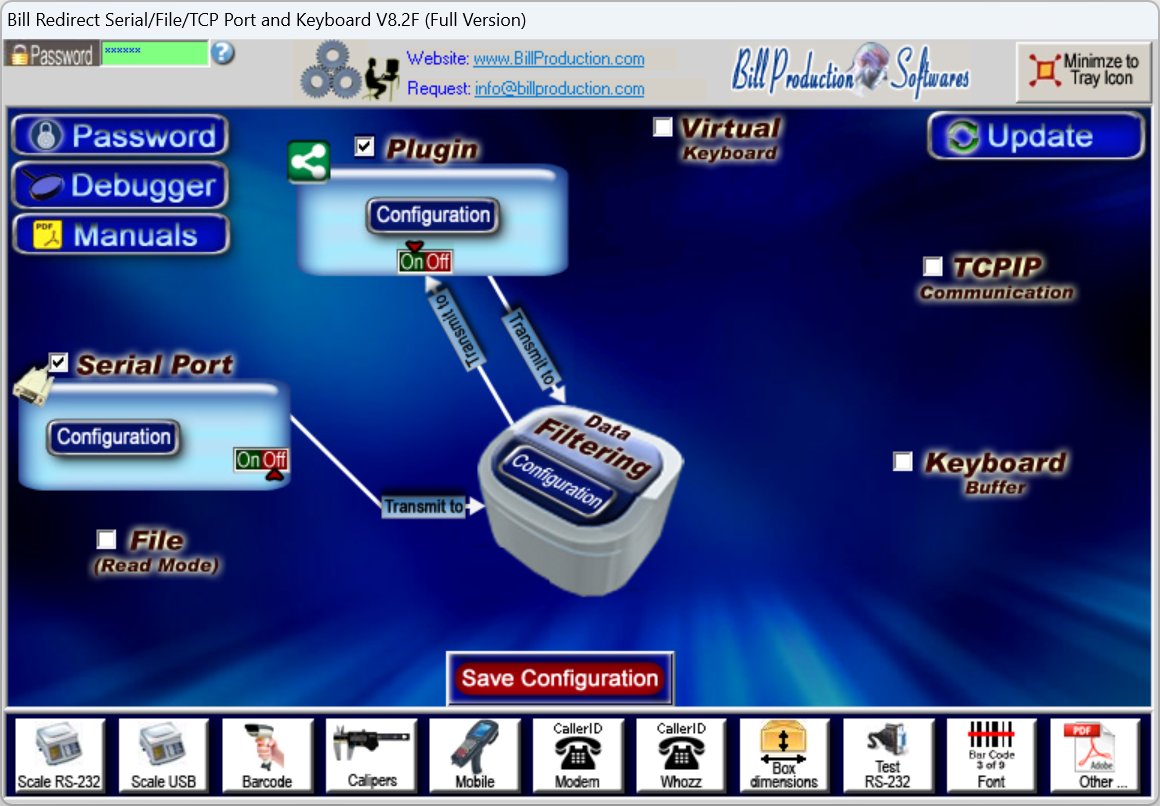
Connect the scale to the computer — RS-232 serial port, USB or Ethernet. In Bill Redirect, click the Scale RS-232 or Scale USB preset button in the bottom toolbar to load a ready-made scale configuration, or enable Serial Port and select the COM port of your scale manually.
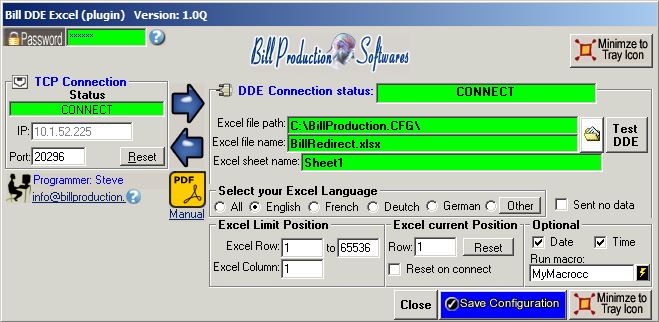
Download the free plugin and extract it into the Bill Redirect folder, then start it. The plugin creates a real-time connection between Bill Redirect and Microsoft Excel — no macros, no VBA required.
In Bill Redirect, enable Plugin so the scale data is routed to Excel.
| A | B | C | |
|---|---|---|---|
| 1 | Date | Weight (kg) | Product |
| 2 | 2026-06-10 | 12.450 | BOX-0042 |
| 3 |
In the plugin, choose the destination cell — for example B2. Press the scale's PRINT button, or let the scale stream continuously: the weight appears in the Excel cell in real time.
Need to clean the data first? Bill Redirect's Data Filtering can add a prefix or suffix, remove unwanted characters and apply Search and Replace rules — so only the clean numeric value lands in your spreadsheet.
Any scale or balance that outputs ASCII data over RS-232, USB or Ethernet. Dedicated guides for the most popular brands:
Industrial, laboratory and retail scales — full integration guide.
Floor scales and industrial weighing — full integration guide.
USB postal and shipping scales — full integration guide.
Office and shipping scales — full integration guide.
Postal scales for shipping stations — full integration guide.
See the complete scale software overview for all brands.
The same Bill Redirect license can also send the scale weight to any Windows application using keyboard emulation, to a specific field of Chrome or Edge with the Web Bridge plugin, to a TCP server, or to a file.
The Microsoft Excel plugin is free. You pay for the Bill Redirect engine — one license per computer.
Bill Redirect is licensed per Windows machine. The Microsoft Excel plugin is free and included. Try the full software before you buy.
Buy now →Install Bill Redirect, connect your scale (RS-232, USB or Ethernet), install the free Microsoft Excel plugin, and choose the destination cell. When the scale sends a weight — by pressing PRINT or streaming continuously — the value is written directly into the Excel cell in real time. No macros, no VBA, no manual copy-paste.
Any scale or balance that outputs ASCII data over RS-232, USB or Ethernet: Mettler Toledo, Ohaus, A&D, Sartorius, Fairbanks, Pelouze, Dymo, USPS postal scales, laboratory balances, shipping scales, industrial floor scales and more. Bill Redirect includes ready-made Scale RS-232 and Scale USB preset configurations.
Yes. The Microsoft Excel plugin creates a real-time connection between Bill Redirect and Excel. As soon as the scale transmits — on demand with the PRINT button, or continuously — the value appears in the cell instantly.
Yes. Bill Redirect's Data Filtering lets you add a prefix or suffix, remove unwanted characters, and use Search and Replace rules — so only the clean numeric value lands in your spreadsheet.
No. The configuration is done entirely from the Bill Redirect interface and the plugin — no programming, no macros, no VBA. Setup takes about 15 minutes.
The default configuration password is: www.billproduction.com
The Microsoft Excel plugin is free. You need a Bill Redirect license: $45 CAD per computer. A full-featured trial version is available before you buy.