Send data from RS-232 scales, USB barcode scanners, RFID readers or any peripheral directly into a specific field of Google Chrome or Microsoft Edge — then optionally simulate an ENTER keypress or click a button you chose. The data lands in the right place, every time. Free plugin for Bill Redirect.
Plug a USB barcode scanner into Windows and it acts like a keyboard: it types data wherever the cursor happens to be. That's fine until the operator clicks somewhere else, switches tabs, or has another window in focus. The data lands in the wrong field — or worse, in the wrong application entirely.
Types into whichever field has focus. Operator clicks a chat window, scans a barcode — data goes into the chat. Operator was on the right form a second ago, but now isn't.
Switching applications, opening a popup, accidentally clicking elsewhere — all break the workflow. Manual cleanup, lost data, frustrated users.
Writes into the field you pre-selected. Even if the operator's cursor is in another window, on another monitor, or in a completely different application — the data lands in the right field of your Chrome or Edge tab.
After filling, it can simulate ENTER or click a specific button to submit. The whole scan-to-submit workflow is automated.
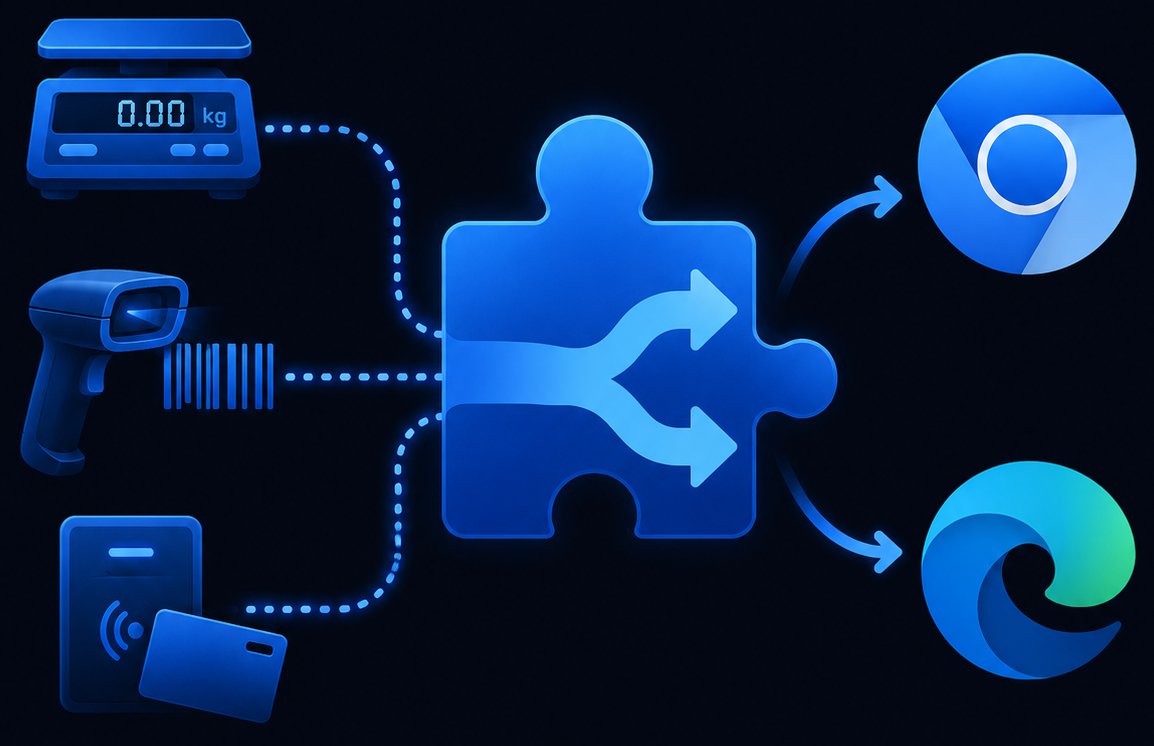
A clear data path: your device sends data to Bill Redirect, Bill Redirect forwards it to the Web Bridge plugin over a local TCP connection, the Web Bridge writes it into the exact field of Chrome or Edge that you targeted.
Download and install Bill Redirect on the Windows computer connected to your peripheral. This is the engine that reads RS-232, USB or TCP data sources.
Drop BillProductionWebBridge.zip into your Bill Redirect folder. The plugin starts and exposes a local TCP server on port 20296. The user manual (PDF) walks through every step.
Click Install for Chrome, Edge, or both — directly from the Web Bridge interface. Restart the browser. The Web Bridge interface shows [ Installed ] when the extension is active.
In Web Bridge, click Select a field in the browser, then click the actual input field in your web app. Web Bridge captures the selector. Optionally set Simulate Enter key or Click this button after filling.
Your operator triggers the device — scans a barcode, presses PRINT on a scale, swipes an RFID card. The value flows from device → Bill Redirect → Web Bridge → exact field in the browser. If configured, ENTER fires or your button gets clicked.
Built specifically for web applications — Chrome and Edge, with the exact field targeting that a generic keyboard wedge can't do.
Pick the input field by clicking on it. Web Bridge captures the element selector — your data goes there, every time, regardless of which window has focus.
Native extensions for both Google Chrome and Microsoft Edge. Install one or both. The Web Bridge interface shows live status for each.
After the field is filled, automatically simulate an ENTER keypress to submit the form, advance the cursor or trigger your form's submit handler.
Or, instead of ENTER, click a specific button you pre-selected — search, submit, add-to-cart, save, anything. Full scan-to-submit automation.
Bill Redirect connects to Web Bridge over local port 20296. Standard TCP, no cloud, no external dependency — everything runs on the operator's machine.
Anything Bill Redirect supports: RS-232 / USB / Ethernet scales, USB barcode scanners, RFID readers, proximity readers, gauges, callipers — any ASCII-output device.
Set the expected URL so Web Bridge only writes when the user is on the right page. Prevents the data from leaking into other tabs or sites.
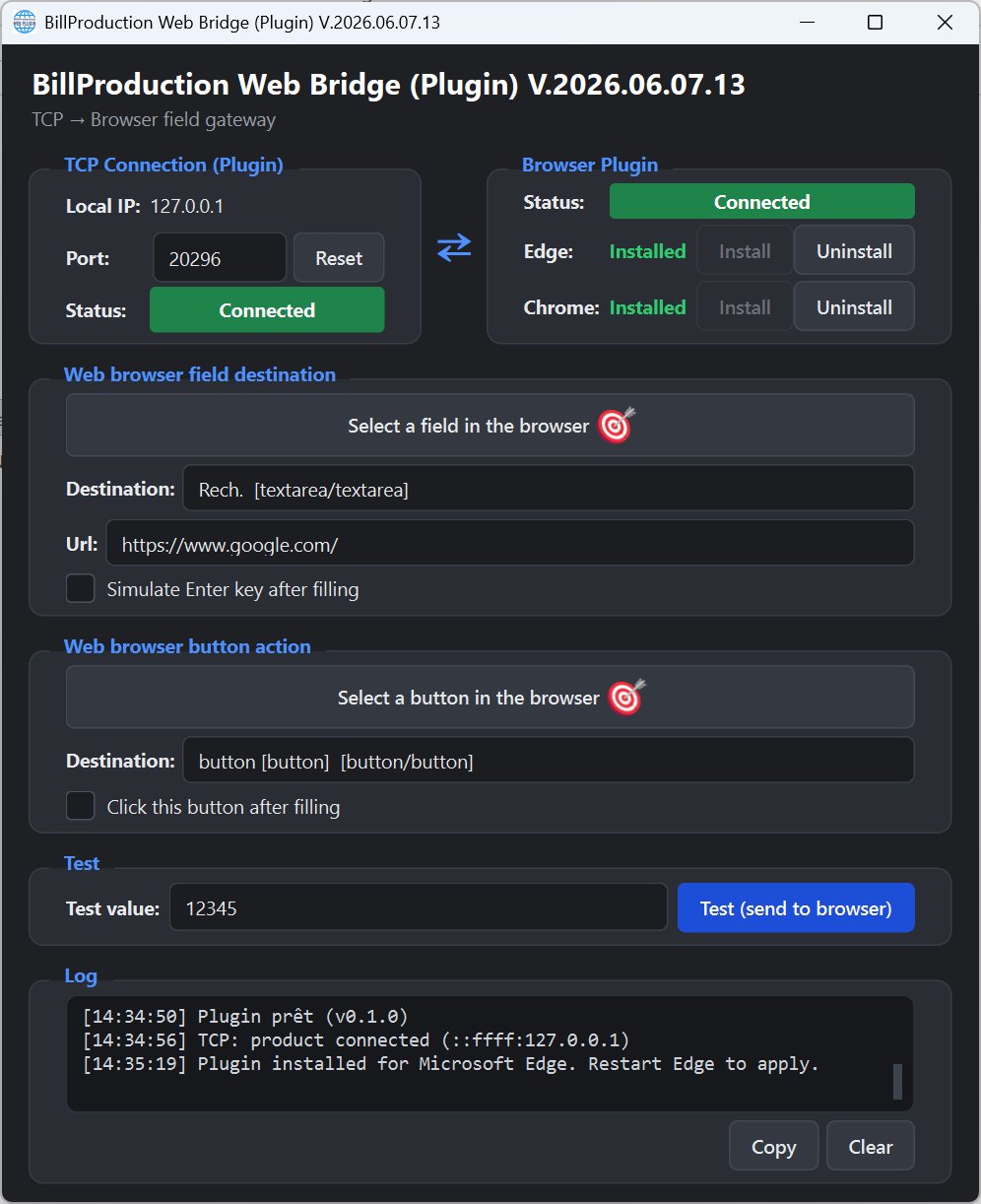
Built-in test value lets you push a fake data point into the field with one click to verify the configuration before the operator's shift starts.
Live log shows every plugin event — connection, install, fill, click. Copy or save the log to troubleshoot or audit the workflow.
Any workflow where your team enters peripheral data into a web-based application — your ERP browser front-end, an intranet form, a SaaS POS, a hospital web app, a shipping portal.
Your point-of-sale runs in Chrome or Edge. The cashier scans a product — the barcode goes into the SKU field, ENTER fires, the line is added. Customer presents a loyalty card — RFID number into the customer lookup field, search button gets clicked. No clicks needed in between.
Modern ERP systems (SAP Fiori, Oracle Cloud, NetSuite, Odoo) run in the browser. Send scale weight to the shipping weight field, barcode scan to the SKU field, RFID badge to the employee ID — directly, without operator clicks.
Scan the patient bracelet barcode, the patient ID lands in the EMR field. Scan the medication barcode, the drug code goes in the prescription field. The web app's autocomplete fires automatically — no cursor placement required by the nurse.
Scale weight goes into the shipping platform's weight field. Tracking number scan goes into the tracking field. Operator works one-handed with a barcode scanner while the other hand handles packages — never touches the keyboard.
Self-service kiosk runs Chrome or Edge in fullscreen. Visitor scans their badge or QR code, the visitor ID lands in the check-in form, the SUBMIT button gets clicked automatically. Zero training, zero clicks.
Operator at a quality control station uses a gauge or calliper. The measurement value streams over RS-232, lands in the QC web form's measurement field. ENTER fires, next sample is queued. Hands stay on the part, not on the keyboard.
Native browser extensions for Chrome and Edge. The peripheral side is anything Bill Redirect supports.
Native extensions, installed in one click from the Web Bridge interface. The plugin shows real-time status for each browser — installed, connected, or not installed yet.
Any device that Bill Redirect can read becomes a Web Bridge source — RS-232 / USB / Ethernet scales, USB barcode scanners, RFID and proximity readers, gauges, callipers.
The plugin is free. Bill Redirect ships with a free trial — upgrade to a license when you're ready.
The keyboard wedge emulation software that powers the peripheral side. Full-featured trial.
The free resident plugin. v2026.06.07.13. Drop it into the Bill Redirect folder, then install the Chrome / Edge extensions in one click.
Complete plugin manual — installation, browser integration, field targeting, ENTER & button automation, troubleshooting.
See the configuration UI — TCP status, browser extension status, field selector, button selector, log panel.
Download the trial of Bill Redirect, drop in the free Web Bridge plugin, install the Chrome or Edge extension — your scan-to-web workflow runs in minutes.
The Web Bridge plugin is free. You pay for the Bill Redirect engine — one license per computer that runs the integration.
Bill Redirect is licensed per Windows machine. The Web Bridge plugin is free and included. Try the full software before you buy.
Buy now →A web browser gateway is software that sends data from a peripheral — a barcode scanner, RS-232 scale, RFID reader, proximity card reader, gauge — directly into a specific field of a web browser like Chrome or Edge. Unlike a generic keyboard wedge that just types where the cursor happens to be, a web browser gateway knows exactly which input field to target, so the data never lands in the wrong place. BillProduction Web Bridge also lets you trigger an ENTER keypress or click a button automatically after the field is filled.
Google Chrome and Microsoft Edge. The Web Bridge plugin installs a small browser extension in each — visible status indicators (Installed / Install / Uninstall) confirm the integration is active. Once installed, restart the browser to apply.
Open the Web Bridge interface, click Select a field in the browser, then click directly on the input field you want in your active Chrome or Edge tab. The Web Bridge captures the element selector and shows you the destination — for example Rech. [textarea/textarea]. Same workflow for the Select a button in the browser option if you want a button to be clicked after the data is written.
Any peripheral that Bill Redirect supports can feed the Web Bridge: RS-232 / USB / Ethernet scales (Mettler Toledo, Ohaus, A&D, Sartorius, Fairbanks and others), USB barcode scanners (Datalogic, Zebra, Symbol, Honeywell), RFID and proximity readers (rfIDEAS and similar), gauges, callipers, and any device that outputs ASCII data over a serial port, USB or TCP.
After the captured data is written into the target field, you can have the Web Bridge automatically (1) simulate an ENTER keypress to submit the form, or (2) click a specific button you've pre-selected — search, submit, add-to-list, anything. This automates the entire scan-to-submit workflow without the operator touching the keyboard or mouse.
Independently. That's the main advantage over a generic keyboard wedge. The Web Bridge writes into the field you pre-selected — even if the operator's cursor is somewhere else, in another window or on another monitor. The data always lands in the right place.
The Web Bridge plugin itself is free. You need a Bill Redirect license to run the engine — $45 CAD per computer, one-time payment per machine. Trial version available before you buy.