Bill Virtual Keyboard lets you design professional on-screen virtual keyboards for Windows. Each button stands alone, can appear only when its related window is active, and can send its data to the keyboard buffer, a TCP port, an RS-232 serial port, the mouse or a file. Add or replace buttons on top of an existing application — ideal for touch-screen and kiosk use cases.
Bill Virtual Keyboard is a Windows application that lets you design custom on-screen keyboards for touch-screen monitors, kiosks, industrial terminals and any setup where a physical keyboard isn't practical. Each key is an independent button — you choose where it appears, when it appears, how big it is, and what it sends when pressed.
Every button can send its data to the keyboard buffer, a TCP port, an RS-232 serial port, the mouse or a file. Buttons can also stay hidden until a specific Windows window becomes active, so the right keys appear at the right moment — without cluttering the screen.
The reference for custom on-screen keyboards on Windows.

Bill Virtual Keyboard
Custom keypads for cashiers — large buttons, only the keys they need, exactly where they need them.
Public-facing kiosks where the physical keyboard is hidden or absent. Show only the keys the kiosk requires.
Dusty, wet or gloved environments where a touch-screen is more practical than a keyboard.
Layer custom keys on top of a legacy application without modifying its source code.
Drive a serial or TCP device — a projector, a relay board, a custom controller — from on-screen buttons.
Switch between AZERTY, QWERTY, numeric or a fully custom layout in one click.
One license — every output channel, every advanced option.
Compare a stock Windows application "before" with the same application "after" custom on-screen buttons have been added on top of it.
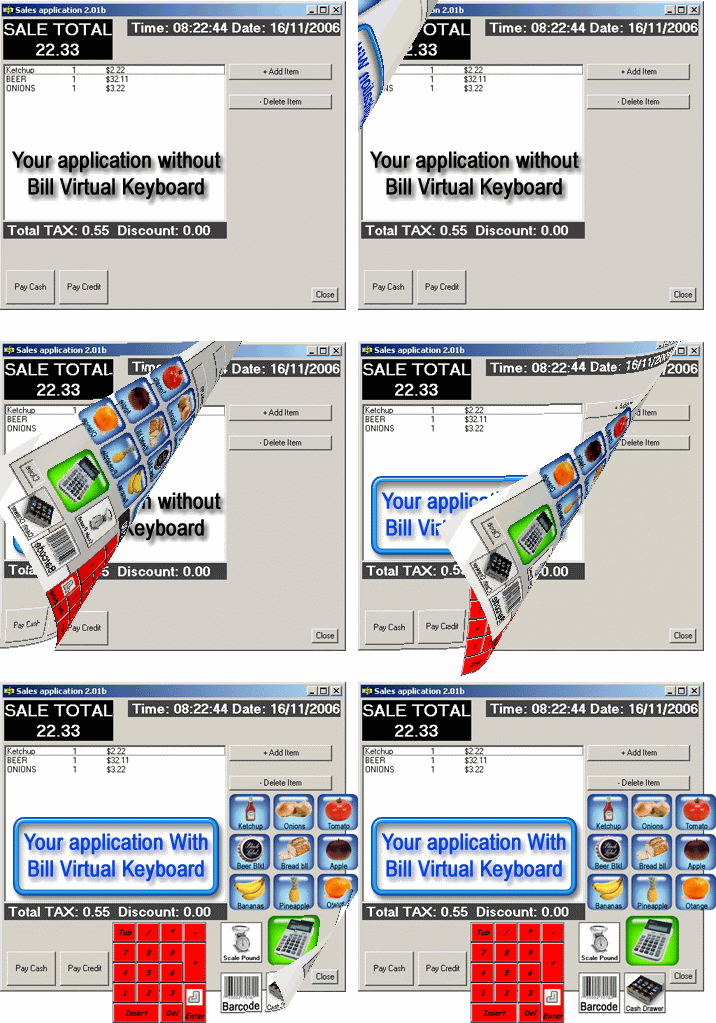
Before: the original Windows application as-is. After: the same application with custom on-screen buttons layered on top — without modifying the underlying software.
Three ready-to-use keyboard layouts ship as separate ZIPs. Download a ZIP, then copy its contents into the Bill Production configuration folder.
After downloading any of the ZIPs below, extract its contents into the
configuration folder C:\BillProduction.CFG\ on the computer where
Bill Virtual Keyboard is installed. Start Bill Redirect software — the layout is loaded
and ready to use.
French-style keyboard. Extract the ZIP contents into C:\BillProduction.CFG\ and launch Bill Redirect software.
Standard English layout. Extract the ZIP contents into C:\BillProduction.CFG\ and launch Bill Redirect software.
Number-only keypad. Extract the ZIP contents into C:\BillProduction.CFG\ and launch Bill Redirect software.
Everything you need to evaluate Bill Virtual Keyboard and design your first on-screen keyboard.

Full-featured trial version. Install, design your first keyboard, test it against your application.
↓ Bill_Virtual_KB.ZIP
The complete Bill Redirect manual — the engine that powers Bill Virtual Keyboard.
↓ Bill_Redirect_Manual.pdf
Step-by-step walkthrough — add a custom button on top of the Windows Calculator application.
↓ Bill_Redirect_VKeyboard.pdfFull-featured trial. Design your first on-screen keyboard in minutes using the included AZERTY, QWERTY or numeric layout as a starting point.
One license per computer. Works on Windows 98 through Windows 11.
$45 CAD per computer. Includes free configuration support.
You don't need a PayPal account to place a credit card order — use the option "Don't have a PayPal account" at checkout.
With over 15 years of experience providing custom integration for more than 300 customers, we can answer any question about your specific touch-screen application.
Email info@billproduction.com with your application, screen size and what you need the buttons to do — you'll usually receive a customized answer the same day. Programmer: Steve.